AD3 Protein Structure Platform: 3D Visualization and an 80% Bundle Cut
Context
The product (AD3, live) serves computational biologists and medicinal chemists investigating protein–ligand interactions. Scientists rely on heavyweight domain tools — 3D molecular viewers, structural chemistry libraries, and interactive charting — to explore and validate hypotheses in the browser. Two specialized libraries handle the visualization work:
- Molstar — An open-source 3D macromolecular viewer used by the RCSB Protein Data Bank itself
- RDKit.js — A WebAssembly port of the industry-standard RDKit cheminformatics toolkit
Both are large (several MB each), and the same Molstar + RDKit combination also ships in the ADC case study, a related product built on the same viewer stack.
Problem
The main JavaScript bundle weighed 32MB. Lighthouse Performance scored 29 on production builds. A rollup-plugin-visualizer treemap revealed that RDKit and Molstar occupied more than 50% of the bundle on routes where neither was used — every page paid the full cost of scientific libraries the user might never touch on that route. The standard fix — route-scoped dynamic() imports — could solve this cleanly, but required precise knowledge of which routes needed which libraries.
What I did
1. Measure
I ran rollup-plugin-visualizer against the production build to identify the worst offenders. The treemap confirmed what load-time profiling suggested: RDKit (structural chemistry) and Molstar (3D molecular viewer) dominated the bundle regardless of the current route.
2. Evaluate alternative approaches
Global compression (brotli / gzip) would reduce transfer size but doesn't change the 32MB that the browser must parse and execute — compression treats the symptom, not the load cost. Indiscriminate lazy loading via React.lazy on every heavy import shifts the cost without addressing the architecture that puts scientific libraries on every route regardless of relevance. Neither approach was sufficient for this codebase; the fix needed to be structural.
3. Route-scoped Molstar/RDKit chunks
I restructured the bundling strategy so that Molstar and RDKit are loaded only on the routes that actually render 3D or structural chemistry views. Routes that serve table-heavy, form-heavy, or dashboard views no longer include these libraries in their main chunk.
4. Selective RDKit bundle imports
RDKit ships a monolithic JavaScript port of its C++ cheminformatics library. I replaced full-library imports with targeted, tree-shakeable entry points — importing only the molecular operations each route needed.
5. Lazy react-plotly.js
The interactive plotting library was being eagerly bundled into every route. I deferred it with route-level dynamic imports so that it loads only on the specific analysis views that use it.
6. Compound Designer — the critical path
The Compound Designer route renders an interactive workspace with 150+ React nodes: molecule viewers, property tables, filter panels, similarity search results, and parallel coordinate plots. The bottlenecks were:
- Viewport loading: Only nodes visible in the current viewport are rendered. As the user scrolls or pans, remaining nodes hydrate on demand.
- Parallel rendering: Independent node trees render concurrently instead of serially.
- Corrected
useEffectdependencies: Several effects were re-running on every render because of missing or stale dependency arrays. Fixing these eliminated thousands of unnecessary re-renders per interaction. - Memoization: Expensive computations — fingerprint generation, similarity scoring, property calculation — are cached with
useMemokeyed on stable inputs.
7. CLS regression
During rollout, a Cumulative Layout Shift regression was detected: dynamic content loading caused layout jumps on the Compound Designer route. The root cause — an unstyled loading container collapsing to zero height — was identified and resolved before the changes reached production.
8. Route-to-library mapping
I mapped every route in the application against its visualization requirements:
| Library | Required on | Not required on |
|---|---|---|
| Molstar (3D viewer) | Structure analysis, docking results | Dashboard, search, admin |
| RDKit.js (2D chem) | Compound designer, property tables | Dashboard, admin, settings |
Both libraries were migrated from top-level imports to route-scoped dynamic() calls:
// Before: every route paid the cost
import { MolstarViewer } from '@molstar/viewer'

// After: only routes that render 3D load Molstar
const MolstarViewer = dynamic(() => import('@/components/3d/MolstarViewer'))

// RDKit.js loaded only on compound-related routes
const RdkitDepiction = dynamic(() => import('@/components/chem/RdkitDepiction'))
Each heavy component receives a skeleton placeholder that matches its final dimensions, preventing layout shift (CLS) during lazy load — the same principle behind the CLS fix in item 7 above.
9. Live demo: the same technique on this site
The panel below demonstrates both libraries loading on-demand. Open DevTools → Network and filter by "rdkit" or "molstar" to see each library load only on this page. The Molstar panel also includes a small preset switcher (Cartoon / Ball & stick / Surface) — three custom StructureRepresentationPresetProviders, the same customization mechanism used to build alternate representation styles on the real platform.
Both libraries are genuinely bundled and code-split, not simulated: RDKit.js (a WASM binary: ~2 MB gzipped over the wire, 6.9 MB uncompressed) is served from this site's own /rdkit/ path, and Molstar loads from the molstar npm package via React.lazy() — the same pattern AD3 itself uses for its viewer component.
Why React.lazy() for Molstar instead of next/dynamic? next/dynamic is built for lazy-loading a single React component; Mol*'s production integration is imperative (createPluginUI mounts directly into a DOM container, not through a component tree Next can code-split on its own). Splitting the whole module behind React.lazy(() => import('./MolstarViewer')) + Suspense defers the entire molstar chunk until this component renders.
Why self-host RDKit.js instead of bundling it — or pulling it from a CDN? RDKit.js is a WebAssembly binary that has to be fetched and compiled at runtime no matter how it's imported, so a <script> tag pointed at a fixed URL is the honest way to load it: the request shows up in DevTools under a readable name, which makes route-scoped loading verifiable rather than merely claimed. That URL is this origin, not a CDN. Serving it from /rdkit/ keeps a third party off the critical path of the page, leaves the script-src and connect-src policies with one fewer origin to allow, and pins the exact build through package.json instead of a URL. It is also what AD3 does — it serves RDKit from its own /rdkit/ location, with the security headers repeated on that nginx block. A build step copies the two files out of the @rdkit/rdkit package into public/; nothing imports the package, since an import would put RDKit back in a bundle and undo the split this page is about.
Results
| Metric | Before | After | Change |
|---|---|---|---|
| Main bundle | 32MB | 6.5MB | −80% |
| Lighthouse Performance | 29 | 78 | +49 |
| Molstar (3D viewer) | Eager import on every route | On-demand (~0.9 MB gzipped chunk, this route only) | lazy-loaded (React.lazy()) |
| RDKit.js (WASM) | Eager bundling | Self-hosted, on-demand | lazy-loaded (<script> injection) |
Measured in Chrome DevTools Lighthouse against a production build under the same test setup before and after. Molstar chunk size measured from this site's own production build (next build) for this route.
The 6.5MB main bundle loads in under three seconds on a typical office connection (measured on a production build, Chrome DevTools throttled to Fast 3G). Subsequent route transitions add only the route-specific chunk.
Anonymized technical illustration
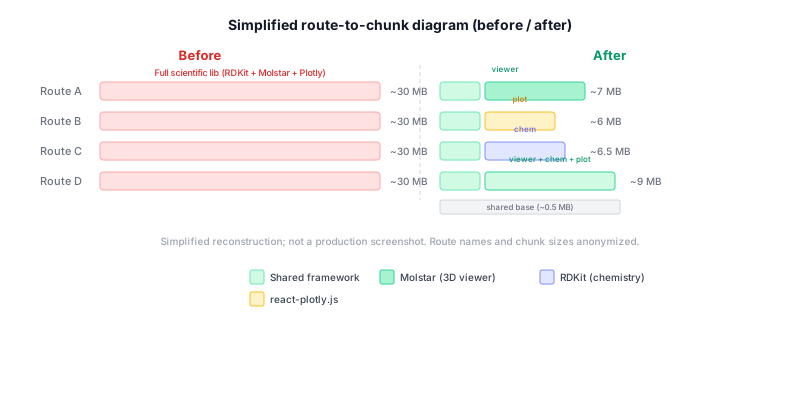
Simplified reconstruction; not a production screenshot.
The diagram shows a representative selection of routes. Before the change, every route included the full scientific library chunk. After the change, each route loads only its required subset.
The same techniques, applied to this site
This case study site itself uses the same route-scoped code splitting and standalone build strategies. To prove the point, a dedicated perf/before-optimization branch recreates the exact AD3 anti-pattern on this site:
- Eager import:
three.js(99 KB) loaded on every route vialayout.tsx - Non-standalone build:
output: 'standalone'removed fromnext.config.ts
The dashboard below compares the unoptimized branch against the current optimized state — directly on this site, not on AD3's closed-source codebase.
This site’s live metrics
Measured from the production build of this case study site. ApexCharts itself is loaded route-scoped — the library adds zero bytes to any other page.
Before & After: same techniques on this site
The “before” state recreates the AD3 anti-pattern: an eager 3D library import on every route plus a non-standalone Docker build. Measured from the perf/before-optimization branch.
Docker production image (runner stage)
Measured separately from the bundle metrics above — different unit (MB), so it has its own axis. Image sizes were measured 2026-08-30; bundle numbers reflect the 2026-10-03 re-measurement.
Main bundle
gzipped · 7 chunks
452.5 KB uncompressed
Docker image (runner stage)
78% smaller vs non-standalone
vs ~492 MB · measured 2026-08-30
Route-scoped loading in action
// ApexCharts loaded ONLY on this page:
const Chart = dynamic(() => import('react-apexcharts'), { ssr: false })

// In the "before" branch, three.js was eagerly loaded in layout.tsx:
import EagerThreeInit from "@/components/EagerThreeInit"  // +508.8 KB every route
Compare branches: git diff perf/before-optimization..HEAD
How to verify these claims
- Clone this repo:
git clone https://github.com/Lajancia/case-study - Current build (optimized):
git checkout main && npm run build && node scripts/measure-bundle.mjs - Unoptimized build (before):
git checkout perf/before-optimization && npm run build && node scripts/measure-before.mjs - Compare the difference:
git diff perf/before-optimization..main -- app/layout.tsx next.config.ts - Verify route-scoped chunks: Open DevTools → Network tab, navigate to this page, and observe that
apexchartsloads as a separate chunk only on this route.
Related
The same Molstar/RDKit viewer combination is used in the ADC case study — a newer product designed with route-scoped loading from day one.
Found this case study interesting?
Always up for a conversation — whether or not there's a project attached.